Saturday, December 7, 2019

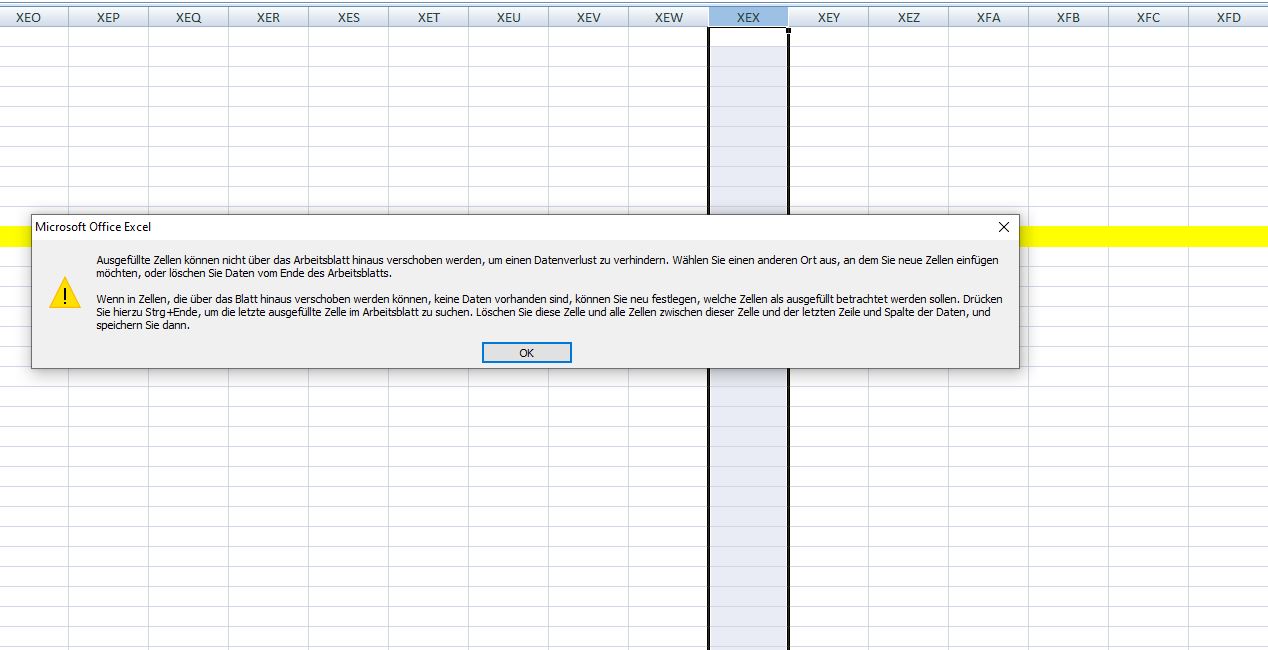
"Microsoft Excel can't insert new cells" - Cannot add new column

You are working in an Excel file and you need to a new row and suddenly an error message blocks you from doing it. What could be the issue here?

Especially in a case where the document has been used for a while, you quickly check the end of the row and don't see any issue. The error message looks like this:
"Microsoft Excel can't insert new cells because it would push non-empty cells off the end of the worksheet. These cells might appear empty but have blank values, some formatting, or a formula. Delete enough rows or columns to make room for what you want to insert and then try again."
So generally there must be somewhere an issue where the last row is filled with something and therefore cannot be moved. The thing is, it can be even by coloring.

As a first step I would go the last columns, mark the last few and look for the "Clear" tool in the ribbon bar. Use "Clear Formats" first and try to add a column.

In my case, around row 100 cells were colored and blocked the whole sheet from adding another row. So there are also ways to find it manually if you know how to look for.

Sunday, October 20, 2019

Me and Programming - It hasn't clicked yet

Despite working in IT jobs for years it was never really required for me to code and program something myself. However, it still feels like unfinished business for me...

Let's go a bit back in time, around a decade ago in the late 2000s I was working in IT administration while doing my apprenticeship. As part of the program I went to school like once or twice a week and programming was also a subject. Some C#, Visual Basic, HTML and php, but that was pretty much it. 

I remember wasn't that bad, I even tried playing around in my free time and got too often stuck with error codes leading my code into a dead end as I couldn't figure out what's wrong. Now I would say that I definitely needed more time to dive in and understand why certain things don't work.

I always had an interest in creating things, be it drawing, writing, creating videos... However creating software I only did to a small degree as mentioned before. Maybe creating a little calculator. I even had a book about C# which would lead ultimate lead to the creation of your own Space Invaders game in the final chapter. I never got that far. I don't know, maybe I couldn't find a way yet making me like the way coding works.

During the past few weeks other people told me (without me asking) about their personal ambitions towards coding, some more realistic, some less. One guy thinks about getting into it for financial reasons, as it gives you plenty of jobs nowadays. Another one intends to completely change his field (he is a chef now) as his live-long dream is going into the game industry. However he is hasn't written a single line of code up until now, so it's quite over-ambitious I'd say.

In my view you need to live to code, put full dedication into it. Like another guy who started in his late 20s to get a university degree in that field. He describes programming as "solving problems" and that's exactly what it is. If you like to find a way out of a dead end, that's probably exactly your thing.

After all these conversation I thought like, ok, maybe I should give it a shot again. I started creating some really simple Excel macros in Visual Basic. However the functions I tried where not really something I could use for work. So I looked at other codes and got simply overwhelmed by its complexity.


I don't wanna be an expert, just wanna do some occasional things for fun. So I wonder which path I should pursue here... I feel like I should know more than I do.

Sunday, April 21, 2019

MS Paint: Change line spacing settings

As the automatic line break in MS Paint is set to double spacing and the GUI doesn't seem to give you a chance to change that, another way had to be found...

As in WordPad and probably many other Microsoft applications the spacing after a line-break can also be changed via shortcuts.

There are three settings:
Ctrl + 1 - normal single line spacing
Ctrl + 2 - double line spacing (default setting)

Ctrl + 5 - 1.5 line spacing (a value in-between)

As I wanted to quickly edit a manga and couldn't find a setting in Paint, I figured that these shortcuts also work here.

Saturday, March 2, 2019

Pokémon GO Q&A: Important questions answered - Part 1


As a casual player or even beginner there are certainly situations you face and you would prefer having a proper answer. On this page, I try to answer a few of these.

Q: What happens if I each the limit of 300 Pokémon?
A: Either you have to buy more spots or you get rid of Pokémon you may have more than once.


Q: How to remove Pokémon and what happens if I do it?
A: If you have too many Pokémon you can send them away. Once a Pokémon is removed, you receive one BonBon of the Pokémon family you let go. Means, if you for example sent away a Bulbasaur, your Venusaur will benefit from it. Can be an efficient way to get BonBons.

Q: How long does it take to evolve to a stronger Pokémon?

A: It depends on the Pokémon. You can see the necessary level to evolve. Usually it's at level 25, 50 or 100! Depending on which Pokémon it can go fast, but if similar Pokémon don't appear often it can take months.

Q: Why is augmented reality not working?
A: Some devices are facing issues that if a new wild Pokémon appears, the camera for showing the real world cannot be used. In this case the following message appears: 
"We’re not detecting your phone’s orientation. Would you like to turn off AR Mode?” It means that your device may not have a gyroscope. Apparently an issue for many Huawei devices.

Q: What is the meaning of the blue aura around some Pokemon in the Pokedex?
A: It simply just means that the Pokémon was just caught recently and the blue aura is only highlighting it.

Q: Can I use the app in the train or bicycle?
A: Yes, you can, but you will get a warning message. Always a chance for a PokéStop at the next train station.
Although I would recommend it anyway near traffic, it also works from bicycle if you don't ride too fast. Tested on empty streets on the countryside.


Q: Can I use train rides to get more km for my eggs?
A: Usually quite quickly a warning message pops up not to use the app while driving. Also, the kilometer count for the eggs stops. However I had a few situations where I actually got some mileage, even if it was just for a few hundred meters.

Q: How to earn virtual money?
A: Go to gyms, defeat all the Pokémon (even if it take several attempts to get their CP down to 0) and then place on of your own Pokémon there. The longer it stays the more you earn. Once it's defeated it will be sent back to you. I don't exactly how it's calculated, but a few hours bring around 30 PokéCoins.
Sunday, December 30, 2018

Facebook map: Many Check-Ins disappeared!

Once again, after adding locations to the Facebook map, another issue emerged.

After adding locations earlier this year the whole Facebook map stopped working. 

However, after reporting it, in August the map with its connected locations returned. The issue was fixed as I could check various places I went.

At the beginning of December I added another album and connected the pictures with location tags, but after that, many locations of my map disappeared, but not all.


And I discovered a pattern: Mostly locations like airports or cities remained, but places like mountains, accommodations or other private spots remained not marked on the map.

Maybe another issue. Did one of the locations I added triggered the it? Or was it rather just a coincidence with a bigger problem? I couldn't find other postings of similar issues so far, but apparently general issues with the Check-Ins happen from time to time.

Let's see when this one is fixed!

Wednesday, December 12, 2018

Pokémon GO 0.129.2.: Lots of Pokémon in Japan!

Now in Japan, I feel like I find more Pokémon than ever before. And Generation 4 is coming!


Now leveled up to level 23 and many more Pokémon on my belt I'm currently running through Japan and I noticed that I can catch many more than before. Most likely because I'm mostly in a city and the chances are therefore higher.

And through this high amount of Pokémon I was able to level up easier and could now finally evolve my pocket monsters. For example all three first Generation Eevee evolutions which seem to be really competitive - especially Jolteon (サンダース) with CP 2032.

According to my Pokédex I have seen 255 different Pokémon and caught 178 of them. With Generation 4 now being added I've got to catch monsters I've never seen before. And since I'm playing it in Japanese since I haven't played games including G4 Pokémon. Especially モウカザル already been one of my favorites.

I also got some more experiences with Gym battles. But it can be really annoying on bigger public places like train stations. Playing with Team Red after trying a few times I defeated the opponents Pokémon, but as I needed a few seconds to recharge my own defeated monsters, I couldn't place my own Pokémon there as another team already took over the gym. No chance, some areas are just to busy.

But even if I could keep the gym at another place - it's not like some at a village where you can keep the gym for a while to receive some coins. I think my record of keeping a Pokémon at gym here in Japan was maybe a bit more than an hour. But still, that was outside Tokyo.

Generally, I have a better feeling for the game now. Using the friends option to exchange presents I also quite interesting. Let's see where I can go from here!

Until my next "Pokémon GO diary" entry!


Wednesday, November 21, 2018

Why I cannot download Japanese apps?

If you go to Japan and open the Google PlayStore you'll find out that you are unable to install some local apps. But is there a solution to work around that problem?

Let's take the example of 'Dragon Ball Legends' which was released this summer. And in the Google Play Store there is a 'western' version and a Japanese version.

However, if you search for the Japanese version using katakana the game doesn't appear in result list. Just English suggestions.

But why?


The reason is that your Google Play Store account needs to be associated to the country Japan instead of your local one.

If you currently live in Japan it makes to be able to see all the apps.

Therefore, what's the next step?

Change to the country! I would suggest the following way (via browser):

  • Login in Google PlayStore website 
  • Go to "Google Account" in the upper right
  • Select "Payments and Subscriptions"
  • "Manage Payment methods"
  • Go to setting to see your "payments profile"
  • Change it to the "Japan" and add necessary information
  • Confirm and wait (can take maybe a few days)

Once it's completed, check on your phone if your are connect to the correct payment profile associated with the country you are living. Now go to PlayStore and see if you can find local apps.


And that's an example an how it should look.