Thursday, April 9, 2026

Discord and Steam not starting, but Internet works


Recently a friend called me for some quick help claiming his Internet isn't working. The provider seemingly was doing something the day before and after they were done he plugged in the router again and then updates and login of Steam and Discord were failing. Also issues with the Opera web browser ...

So he asked me to connect via TeamViewer which actually worked, already a good sign. I tried checking opening random websites. Mostly fine depending on browser. But some software couldn't get proper Internet connection, so something was off. Other devices in the same network no issues, but these were running over Wifi. Searching around and after trying ipconfig I got an idea. The IP address started with 169.x, so basically a placeholder for a failed attempt. Interestingly Internet still worked despite that. "Ipconfig/ renew" didn't work either, so I manually added the Google DNS 8.8.8.8. And that actually worked! Ip address is there and Discord etc. working again.

But how did this happen? My friend later said that he initially plugged the LAN cable in the wrong port of the router. And maybe that's were the DHCP request failed and maybe got stuck? Either way, solved.


Tuesday, April 15, 2025

My thoughts on things in April 2025

I haven't been posting here a lot recently, but I'd like to give some thoughts regarding some things going through my mind. 

AI tools like ChatGPT

AI tools are certainly becoming more and more a thing of our daily life. Playing around with creating images, reassuring vocabulary etc. Even becoming an essential tool at work in many ways. Despite there are mistakes here and there, the development over the recent years is quite astonishing. The difficult part will be like finding the right balance.

The end of Skype

Yes, Skype is actually ending next month. I can see why since Microsoft also has Teams and maybe wants to rather focus on that. I just made the switch a few days ago, the transition was mostly flawless. It has been a long run with Skype. Especially during the last 10 years Skype while travelling and now living abroad it has been an essential tool to stay in touch with family and friends. It's the end of an era and let's see whether everyone will make the switch to Teams or rather uses alternate options.

6 more months of Updates for Windows 10

I might be a more crazy example, but I still use a Lenovo laptop which I bought almost 10 years ago. It's certainly getting slower and a reinstallation even failed when I tried a few months ago. An upgrade to Windows 11 is not even possible due to hardware limitations. So maybe it's time for a switch later this year. For work I already use Windows 11 and can see its benefits, but haven't gone too deep just yet. Still, certainly interesting that an operation system which was supposed to be the "final" Windows will no longer be supported. Will be possible lead to lots of hardware trash. I know even people who bought a new laptop in 2020/21 won't even make it through the new hardware requirements. It feels timing-wise a bit early and certainly a better date could have been found. It doesn't need to be as long as the life cycle of XP, but still not ideal - as many people certainly won't make the switch and may become an easy target. We will see if Microsoft goes through with that.


Monday, August 12, 2024

Evernote - We had a good run


I used Evernote since 2012 and the app has been really useful to me throughout the years, but recently developments force me find other ways.

Crazy to think about that I started using the app already 12 years ago. The appealing point was that I could create things like personal To-do lists on either phone or PC and keep them synchronized. Was ideal for planning travels or just keeping personal notes for things you shouldn't forget. I even used it sometimes for longer texts such as fanfiction stories.

All good, but I think it was earlier this year things became more difficult for free users as the amount of notes was reduced to around 20 I think. Was still fine with me. There were only a few notes which I would regularly update. So I exported old ones into html files and just kept using occasional notes. The pop-ups all the time were quite annoying, but was still fine for the time being.

Maybe I was too optimistic while others already smelled the fire. A recent change now only allows only one free device per user. And that made the app no longer useful for me. I will now go with a very simple and free alternative: GoogleDocs.

It does everything I need and it's not justifiable to have a monthly subscription for synchronizing a few KB of text files. A shame, but there were are. Will the paid model work in the long-term? Time will tell, but I won't be a part of it.

Saturday, December 30, 2023

Beijing Airport and the Firewall...


An 8 hour stopover in Beijing, not the first time, so I was aware that using things like Google, Facebook could be tricky. I installed NordVPN on my phone as well. In 2019 it allowed me to avoid the firewall and at least I could send some messages. But not so this time at the end of 2023...

By now, also NordVPN was blocked and I couldn't connect to any country. Didn't really think of a Plan B, thought it's just 8 hours, no problem. But then I saw my flight is getting delayed by an hour. Also no big deal, but would be nice to inform my sister who was going to pick me up. 

As Google and Facebook things don't work... I remembered that I still got a Yahoo mail address... But I need a SMS verification code to login - which I couldn't receive there...
Creating a new email address with some German providers ... No, even though these websites generally worked, the providers blocked China from creating new accounts.

Interestingly, despite the firewall I could still receive push messages like from WhatsApp, but of course answering them didn't work.

Then I thought that probably TikTok would work... Well, of course PlayStore doesn't work either.
Since I'm ironically still using a Huawei phone, I could use its specific app store. And then I saw Snapchat.. And I know that my sister uses it.

Installed it, luckily no email verification needed and as the app searched through my phone contacts, I could easily find her. 

Problem solved, but my sister was quite surprised to see me on Snapchat...^^

Tuesday, May 31, 2022

Extend your Japan Visa online, but don't use Gmail!


With having finally the option to extend my Japan visa online, I thought I'd give it a go this year. But I ran into some interesting roadblocks...


First off all, a MyNumber card (マイナンバーカード) is required which I already got last. 

Then you need a card reader for your PC which can read the MyNumber card. In my case I got the 接触型ICカードリーダー from Goppa. 

Once everything's connected you need to install the JPKI利用者ソフト, and also add the browser plugin (such as from Google Chrome).

Some little font issue...

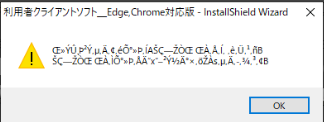
To ensure that the card reader works, I connected my card and opened the JPKI software to check. Interestingly, despite my PC having been set to Japanese language, sometimes letters could not be properly displayed.

Solution: In "Control Panel > Region > Administrative > Change system locale..." the language needs to be set to Japanese with ""Beta: Use Unicode UTF-8 for worldwide language support" to be unchecked.

Following that things like my visa expiration date could be read from the MyNumber card properly. Everything can only be read after entering your PIN(s) of course.

Then it was time to go to that immigration website and create an account (登録).

During that process you fill out basic information such as where you live.
After the final screen (Step 3) the screen displays a message that I should receive an email to continue - and which should also allow me to create a password for the account.

I'd also recommend making a screenshot or writing down the 認証 ID. Especially considering what happened next...

The Mail to Change your Password...

I waited a few days to the next weekend where I still didn't receive an email. So I tried to use the "Change Password" option to trigger the email to be resent. As expected nothing happened.

Following that I emailed the support email address which is mentioned on that site. About 24 hours later I got the answer that it's not recommended using so-called フリーメール (free email services) such as Google, Hotmail or iCloud.

As that Immigration website uses a system which restricts access to overseas IP addresses.

Wow. That wasn't mentioned anywhere on that website.

At that point I wondered which email provider I could actually use. So I started researching online, but since that system is quite new, it was hard to find any information regarding that topic. 

Luckily I found an article on spouse-visa.jp explaining the whole process (which was luckily just posted the day before), where it's mentioned that Yahoo email addresses (assuming ending with co.jp) can actually be used.

Luckily I created a Yahoo address at some point before, so I rechecked whether I could actually log in again.

Following that I called my local immigration office as recommended in the previous email in order to change the email address of my already registered account.

However I got advised to call the number of that other company doing the support of that site. So I called there as well, but they actually cannot change the email address and told me to call the Immigration office again.

So I coincidentally ended up with the same guy as before again, but after explaining the situation I got send to another co-worker.

Here I finally got the chance to change my email address, but that person advised me that it's not recommend to use any free mail service, even Yahoo would not be possible.

Mail services coming from a phone provider such as Softbank should rather be used.
However I insisted on using a Yahoo address for now and in case it still wouldn't work, I could call again. The guy on the other side then kindly changed my email address as requested to my Yahoo one.

He said it could take around 30 minutes to a few hours for the changes to take effect.
I was quite hopeful that it would work, but you never know, so I went for a walk, came back a
nd in fact after a bit more than an hour even a confirmation email for the "email address change" had arrived on my Yahoo address. 

I tried the password reset and even that email arrived immediately.

From here on onwards I could continue to fill out the forms and upload all the documents I had prepared. Also here I kept using my Yahoo address as further mails regarding my visa would go there as well (keep checking there occasionally or forward it).

Such as the final confirmation mail which came the day later.

Now my new residents card should be on its way soon.

Monday, February 15, 2021

Canon IJ Scan Utility settings get overwritten by default settings - Fix

The Canon IJ Scan Utility is a common tool to receive documents from a scanner on your PC - which I use for quite some years already. You can set it up in a way that for example PDFs are getting automatically attached to a new email. But how can you prevent that your settings get overwritten?

I set up this tool for my parents before, since they only use the scanner to be able to send certain documents via email. However occasionally these settings seemingly get overwritten by the default settings. Not sure whether they accidentally hit the "Default" button or something else is causing it... 

However, after fixing it a few times manually I starting looking for an permanent solution. As I could find nothing via online search I got an interesting (old-school) idea myself.

I had to find out where there the settings are actually saved and it's here:

C:\Users\Andy\AppData\Roaming\Canon\IJ Scan Utility

In this folder there are two files:

UICOM.dat
UIVER.dat


And if you apply changes within the software the time of the "last change" affects these two files. Which led me to the following plan:

1) Set up the Canon IJ Scan Utility settings in the way it should be permanently used

2) Close the application

3) Navigate to the folder mentioned above

4) Go to the Properties of each file and mark "Read-Only"


5) Confirm for both files

6) Now you can test it:
- Open the Canon IJ Scan Utility
- Go to settings, reset settings to default
(Note that the settings initially indeed get reset to default, but...)
- Close the software
- Reopen it
- The default settings are gone, you previously "Read-Only" settings are applied (as the software only reads from these files when it opens)

Hope this can help you! In my case it did! :) 

Sunday, July 12, 2020

Global Protection suggesting Windows VPN Settings...

As a GlobalProtect installation and configuration should usually work quite smoothly I hit by a little roadblock... 

After GlobalProtect is installed I should usually get the dialog to enter the VPN connection settings. Instead I got the following message:

"To establish a VPN connection, select the GlobalProtect VPN configuration from Windows NETWORK & INTERNET VPN Settings." 

So GlobalProtect basically wants me to use the local Windows network settings instead of its own. Initially I couldn't really follow, but I figured that I may went too quickly through the installation.

Once I downloaded the Global protect the installer went straight to the Windows Store and I mistakenly confirmed that following message:

So "accidentally" I installed it the Windows Store version which didn't work in my case as I used a special download before.

Correct would be: "Continue installing from outside the Store".
And then the application worked the way it should...

Just a little thing you easily overlook trying that just before going to bed after a long day...

Friday, May 15, 2020

TheSuperAdmins #008: Home Office Support

Following the Coronavirus pandemic and subsequent "lockdowns", many office workers are forced to work from home. Therefore it's important for the admins to set proper VPN connections for everyone..


With Will residing at his lakehouse watching Netflix, Mike faces several users with wrong VPN settings...

Tuesday, April 14, 2020

Sony Vegas: How to create a multi-screen channel trailer?

Recently a friend asked me to create a trailer for his Let's Play Gaming Channel. So I got the idea to create a wall of TVs where each screen shows a different game he is playing with the camera moving around from one screen to another...

Even though I'm quite familiar with Sony Vegas, I haven't done something like that before. That's why the whole process was so interesting and the result so satisfying. That's how the final version looks like:


Not too bad, right? So let's go step by step explaining on how to make such a trailer.

1) Creating a TV wall
For doing that you either look for a fitting image online or create your own one. Make sure you can it has about as many screens as video clips you want to use. Once you've chosen a picture you put at the bottom of your project. 2) Put the clips on the screens
I downloaded like 12 videos of different games from my friend's channel. Then I started one by one, putting a video file above the TV wall template and minimized them by clicking on the icon at the edge of the clip in the timeline to open a window. Then you can accurately adapt the size of the clip and move it around to match on one of the TVs of your template.

That step you do with every clip until your TV wall is finished. That wall full of screen may looks like this.


3) Rendering the TV wall video
Following that I rendered like a 30 second clip of that wall. This new file I copied into my project.

4) Let the "virtual camera" run Now you work with your newly created TV wall clip in your project. Click again on the small icon at the bottom of your clip (see first screenshot in Step 1).

At the bottom of that menu you see a timeline where you can set time markers. Now you can decide where to place the "F" window at each second.


You can zoom in, zoom out. Experiment a bit which works the best for you. In my case it worked best not to leave the gaps too big as moved the "F" window slowly from right to left to show the channel logo at the end.

And that way you can create this kind of trailer video. For music I chose to use a fitting track in the YouTube Audio Library.

I hope I could help or inspire you to create a nice channel trailer.

Btw. I also made a tutorial video about it, if you wanna see a deeper explanation:


Tuesday, April 7, 2020

Sony Vegas: How to Use Speech Bubbles

Is there a proper way to create speech bubbles with Sony Vegas? Not really, but there's a quite simple way doing it in combination with GIMP.

Surely, you can also just download pictures from a Google image search, but if you wanna create a customized speech balloon, I'd recommend using the free GIMP software. So, step by step:

1) Open GIMP, and create a new project with an empty layer. Ensure that the layer is transparent.


2) Use the pencil to draw a speech bubble. Alternately, you can create by using the circle form.

3) Fill the inner part of the bubble with white color


4) Save the file as png to keep the background transparent.

5) Go back to your Sony Vegas project


6) Add the png file into the project

7) Adapt the file to the same ratio as the video you are making (e.g. 16:9)

8) Adjust the speech bubble to the size you need it

9) Add an extra text box with the text for the speech bubble

And that's it. Also check out the corresponding video below:

Monday, April 6, 2020

The annoying KB4532693 patch and temporary profiles

In February 2020 the Windows 10 patch KB4532693 was deployed and caused on some PCs logins on temporary profiles instead of the normal one. Here's something from my experience!

These days I got a request and the client even thought that the computer reinstalled itself which obviously wasn't the case Therefore no data got lost in this case. I read about the patch problem before, so following making some research I tried suggested steps as well:

1) Starting in Safe Mode, reboot in Normal Mode
- Didn't help, same issue

2) Uninstalling KB4532693
- Despite being listed in downloaded updates, it didn't appear in the list "Installed Updates". So to be sure I deleted the update via cmd command:

wusa /uninstall /kb:4532693 /quiet
Following a restart the situation didn't change. The list of temporary profiles gets piled up even more.

As several restarts didn't work either,  I ended up helping myself by creating a new user as admin, logged off and logged in with the new user, copied all the data, configured the profile and restarted a few times to be sure. Additionally I changed some settings in the registry to ensure the new profile logs in automatically.

It was a private laptop anyway with no connection to a domain whatsoever. 


Not the most ideal solution, but seemingly there's yet no official solution for the patch out yet - only the suggestions I mentioned above. Sometimes they help, in my case they didn't, so luckily I could find a workaround by just creating a new user.

Monday, March 9, 2020

TheSuperAdmins #007: Storage Request

We got March and our admins get a quite unusual request from the front desk... 


So that explains the shortage on toilet paper which we currently witness in several countries...

Friday, February 14, 2020

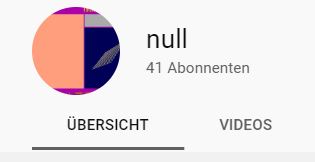
YouTube Channel name "null" - How to fix it!

Your YouTube channel name is suddenly displayed with the name "null"? Here's how to fix it!

Last month a friend of mine created a new YouTube channel and in the last few days I noticed that instead of his real channel name, "null" is displayed. But why?

As Internet search couldn't give me a proper answer, I figured that the issue only occurs when I use YouTube in English. For example on one of my Japanese devices the name was displayed as usual, and switching to German also shows no problem.


So I thought it there might be an issue with the translation settings. 
And that was THE problem: The settings for the channel name in English were wrong, the channel name was written as "null".
It happens automatically if you try to add a new language but leave the channel name blank. However, this issue seemingly only appears when you make the first translation that you are allowed to leave the channel name blank. When you try later on to change "null" to blank, YouTube won't let you continue.

I could easily reproduce the issue with my English channel by adding a German translation to it.

So here's how to fix it:
1) Click on the upper right drop-down list to switch to the language your YouTube channel was originally created in
2) Select "Customize Channel"
3) Click on the settings wheel on the right
4) Look for "Translate Info" and click on the link "translating channel info"

5) Select "translate into". 
To fix the issue just copy-paste the channel title from the original channel or name it as you wish
6) Select "Save" and the issue should be fixed.

Thanks for reading and let me know in the comments if it could help you or if you got something to add on this!

Monday, February 3, 2020

TheSuperAdmins #006: No Computer Virus

With the Coronavirus becoming a big topic in the news, our IT department is also more or less aware of it...


After a long time I could make another little comic, I hope the next one doesn't take that much time! Anyway, thanks for reading and I hope you enjoyed!

Wednesday, January 22, 2020

PS2: Reaction Time Issues while Recording "Burnout Revenge" footage

In the classic PS2 game Burnout Revenge reaction is quite crucial, be it to avoid other cars or making a proper start in the mode "Crash Party". However, when you record footage it may raises the difficulty level in an interesting way...

As a friend and me have our Crash Party battle from time to time, we decided to now finally record it. Also, he started doing "Let's Plays" on Twitch and YouTube, so it would be appropriate footage for his channel.

For doing that, I used my old Sony RDR HX 680 B DVD and HDD recorder. So I connected the PS2 with a SCART cable to the input slot of the recorder and another SCART cable for the output from the recorder to the TV.

YouTube: Tankh

After a recording test we started playing. A Crash Party with 9 rounds and two players. To quickly explain the starting procedure:
You hit the X button once to start the engine, and as the RPM go higher (seen through a line of fire) you have to press X again (to avoid explosion). Then the line goes down again and you have to press X a third time. Depending on how accurately you press X the second and third time determines how good you start is going to be.

However, as the recording device was between the PS2 and the TV, the screen was probably a few milliseconds behind, causing us players being unable to hit X an the right moment, making the cars either explode and stalling the engine.


As we were first surprised on what happened there, it took as a bit the figure out what's the issue. Ultimately we could adapt to the situation and I even got a score of around 10 million for like three times in a row (see video above).

Quite interesting situation, right? Someone seen that before? I guess the issue is either the SCART cable, the device, or both...

Unrelated, but worth to mention:  How about getting the footage to a PC? There's no other way than burning it on a DVD and then convert the files from the DVD on your PC. I usually use HandBrake for that. The audio was recorded separately and later merged together with the video file.

Saturday, December 7, 2019

"Microsoft Excel can't insert new cells" - Cannot add new column

You are working in an Excel file and you need to a new row and suddenly an error message blocks you from doing it. What could be the issue here?

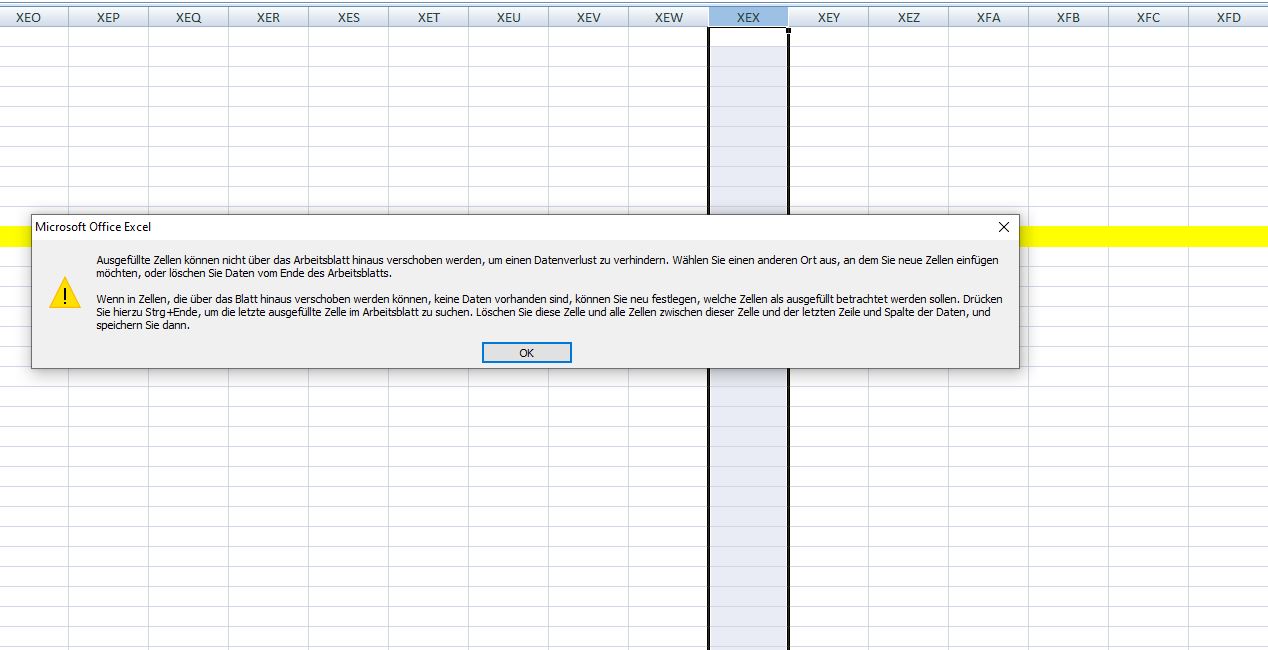
Especially in a case where the document has been used for a while, you quickly check the end of the row and don't see any issue. The error message looks like this:
"Microsoft Excel can't insert new cells because it would push non-empty cells off the end of the worksheet. These cells might appear empty but have blank values, some formatting, or a formula. Delete enough rows or columns to make room for what you want to insert and then try again."
So generally there must be somewhere an issue where the last row is filled with something and therefore cannot be moved. The thing is, it can be even by coloring.

As a first step I would go the last columns, mark the last few and look for the "Clear" tool in the ribbon bar. Use "Clear Formats" first and try to add a column.

In my case, around row 100 cells were colored and blocked the whole sheet from adding another row. So there are also ways to find it manually if you know how to look for.

Sunday, October 20, 2019

Me and Programming - It hasn't clicked yet

Despite working in IT jobs for years it was never really required for me to code and program something myself. However, it still feels like unfinished business for me...

Let's go a bit back in time, around a decade ago in the late 2000s I was working in IT administration while doing my apprenticeship. As part of the program I went to school like once or twice a week and programming was also a subject. Some C#, Visual Basic, HTML and php, but that was pretty much it. 

I remember wasn't that bad, I even tried playing around in my free time and got too often stuck with error codes leading my code into a dead end as I couldn't figure out what's wrong. Now I would say that I definitely needed more time to dive in and understand why certain things don't work.

I always had an interest in creating things, be it drawing, writing, creating videos... However creating software I only did to a small degree as mentioned before. Maybe creating a little calculator. I even had a book about C# which would lead ultimate lead to the creation of your own Space Invaders game in the final chapter. I never got that far. I don't know, maybe I couldn't find a way yet making me like the way coding works.

During the past few weeks other people told me (without me asking) about their personal ambitions towards coding, some more realistic, some less. One guy thinks about getting into it for financial reasons, as it gives you plenty of jobs nowadays. Another one intends to completely change his field (he is a chef now) as his live-long dream is going into the game industry. However he is hasn't written a single line of code up until now, so it's quite over-ambitious I'd say.

In my view you need to live to code, put full dedication into it. Like another guy who started in his late 20s to get a university degree in that field. He describes programming as "solving problems" and that's exactly what it is. If you like to find a way out of a dead end, that's probably exactly your thing.

After all these conversation I thought like, ok, maybe I should give it a shot again. I started creating some really simple Excel macros in Visual Basic. However the functions I tried where not really something I could use for work. So I looked at other codes and got simply overwhelmed by its complexity.


I don't wanna be an expert, just wanna do some occasional things for fun. So I wonder which path I should pursue here... I feel like I should know more than I do.

Sunday, April 21, 2019

MS Paint: Change line spacing settings

As the automatic line break in MS Paint is set to double spacing and the GUI doesn't seem to give you a chance to change that, another way had to be found...

As in WordPad and probably many other Microsoft applications the spacing after a line-break can also be changed via shortcuts.

There are three settings:
Ctrl + 1 - normal single line spacing
Ctrl + 2 - double line spacing (default setting)

Ctrl + 5 - 1.5 line spacing (a value in-between)

As I wanted to quickly edit a manga and couldn't find a setting in Paint, I figured that these shortcuts also work here.

Saturday, March 2, 2019

Pokémon GO Q&A: Important questions answered - Part 1


As a casual player or even beginner there are certainly situations you face and you would prefer having a proper answer. On this page, I try to answer a few of these.

Q: What happens if I each the limit of 300 Pokémon?
A: Either you have to buy more spots or you get rid of Pokémon you may have more than once.


Q: How to remove Pokémon and what happens if I do it?
A: If you have too many Pokémon you can send them away. Once a Pokémon is removed, you receive one BonBon of the Pokémon family you let go. Means, if you for example sent away a Bulbasaur, your Venusaur will benefit from it. Can be an efficient way to get BonBons.

Q: How long does it take to evolve to a stronger Pokémon?

A: It depends on the Pokémon. You can see the necessary level to evolve. Usually it's at level 25, 50 or 100! Depending on which Pokémon it can go fast, but if similar Pokémon don't appear often it can take months.

Q: Why is augmented reality not working?
A: Some devices are facing issues that if a new wild Pokémon appears, the camera for showing the real world cannot be used. In this case the following message appears: 
"We’re not detecting your phone’s orientation. Would you like to turn off AR Mode?” It means that your device may not have a gyroscope. Apparently an issue for many Huawei devices.

Q: What is the meaning of the blue aura around some Pokemon in the Pokedex?
A: It simply just means that the Pokémon was just caught recently and the blue aura is only highlighting it.

Q: Can I use the app in the train or bicycle?
A: Yes, you can, but you will get a warning message. Always a chance for a PokéStop at the next train station.
Although I would recommend it anyway near traffic, it also works from bicycle if you don't ride too fast. Tested on empty streets on the countryside.


Q: Can I use train rides to get more km for my eggs?
A: Usually quite quickly a warning message pops up not to use the app while driving. Also, the kilometer count for the eggs stops. However I had a few situations where I actually got some mileage, even if it was just for a few hundred meters.

Q: How to earn virtual money?
A: Go to gyms, defeat all the Pokémon (even if it take several attempts to get their CP down to 0) and then place on of your own Pokémon there. The longer it stays the more you earn. Once it's defeated it will be sent back to you. I don't exactly how it's calculated, but a few hours bring around 30 PokéCoins.

Sunday, December 30, 2018

Facebook map: Many Check-Ins disappeared!

Once again, after adding locations to the Facebook map, another issue emerged.

After adding locations earlier this year the whole Facebook map stopped working. 

However, after reporting it, in August the map with its connected locations returned. The issue was fixed as I could check various places I went.

At the beginning of December I added another album and connected the pictures with location tags, but after that, many locations of my map disappeared, but not all.


And I discovered a pattern: Mostly locations like airports or cities remained, but places like mountains, accommodations or other private spots remained not marked on the map.

Maybe another issue. Did one of the locations I added triggered the it? Or was it rather just a coincidence with a bigger problem? I couldn't find other postings of similar issues so far, but apparently general issues with the Check-Ins happen from time to time.

Let's see when this one is fixed!